Ugiwise

A learning app for your phone

Your Arcade Gym for Python, C and C++

Understand the code. Make a change. See why it works.

  • Read say what a short program prints, with diagrams of what happens inside
  • Change fill a gap, fix a bug, type the line yourself
  • See why every answer, right or wrong, comes with the reason

In development for Android. Not in any app store yet.

A Ugiwise challenge on a phone. The learner has typed printf("Lock\n"); into a C program, and a green panel says Correct: one call statement, written after the first, so it runs second.

Challenge 01 · C · Stage 1

Your first rep: write one line of C.

The whole idea on one screen: read a short program, make one change, and see why it works — or what to fix. This is a real challenge from the app’s first C stage, typed on the phone’s keyboard with the symbols C needs one tap away.

The door has to open before it locks, and Open is already shown. Write the statement that shows Lock on its own line after it, and ends that line.

Your code main.c

Program before your line:

#include <stdio.h>

int main(void)
{
    printf("Open\n");

Program after your line:

    return 0;
}

Expected output

Open
Lock

Your code isn’t run — not here, not in the app. It’s compared with versions that were compiled and tested. This demo checks this one challenge only.

How the check works

The check splits what you typed into C tokens — names, numbers, strings, punctuation — and compares them with a short list of versions that were each compiled and run when the challenge was written. Spacing and comments don’t matter; the text inside quotes does, because that’s what gets printed.

  • Correct your code is one of the verified versions.
  • Not quite a mistake it can name for certain — a missing semicolon, single quotes, a misspelt name — and what to change.
  • Keep looking something it can’t verify. It might still be correct C, so it isn’t marked wrong.

This page runs a port of the app’s own checker, limited to this challenge and its authored answers. In the app, an answer it can’t verify also offers Skip for now.

From the pointer lab

Two arrows, one box.

Pointers stop being mysterious when you can watch them. Step through five lines: two pointers aim at the same variable, one of them writes through it — and the other sees the change.

Step 1 of 5

  1. int total = 4;
  2. int *a = &total;
  3. int *b = &total;
  4. *a = 9;
  5. printf("%d %d %d\n", total, *a, *b);
total holds 4. a int * b int * total int 4

One object, called total, holding 4.

Nothing printed yet

Adapted from one of the step-through scenarios in the app’s pointer lab. In the app, some steps stop and ask you to predict what happens before they show you.

The workout

Every lesson is a short workout.

A few minutes, one idea. It’s taught before it’s tested, and every answer — right or wrong — comes with the reason.

A lesson diagram of int a[10] = {[2] = 30, [5] = 60}; drawn as ten cells. Cells 2 and 5 are marked designated and hold 30 and 60; the rest hold 0. A linked bar reads: [5] = 60 put 60 into a[5].

Learn it, then see it.

Each idea gets a short explanation next to the code it’s about, then a picture of what happens: array cells, where a pointer points, a program traced one line at a time. Tap a cell and the code that put its value there lights up.

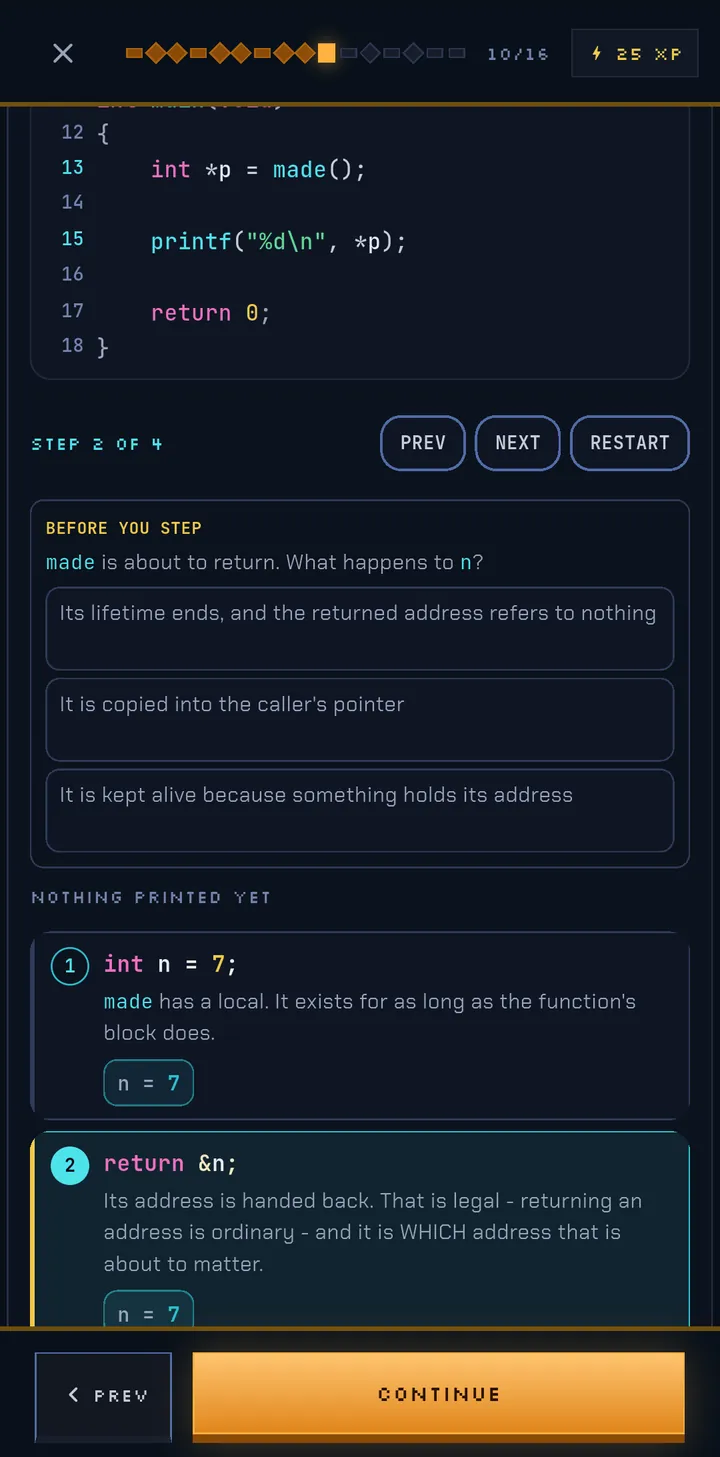
A step-through trace, step 2 of 4. Before stepping, the screen asks: made is about to return, what happens to n? Three possible answers are listed above the traced lines.

Call it before it runs.

Predict the output, spot the line with the bug, fill the gap, pick the right answer. In a trace, the lesson stops before a step and asks what happens — then shows you.

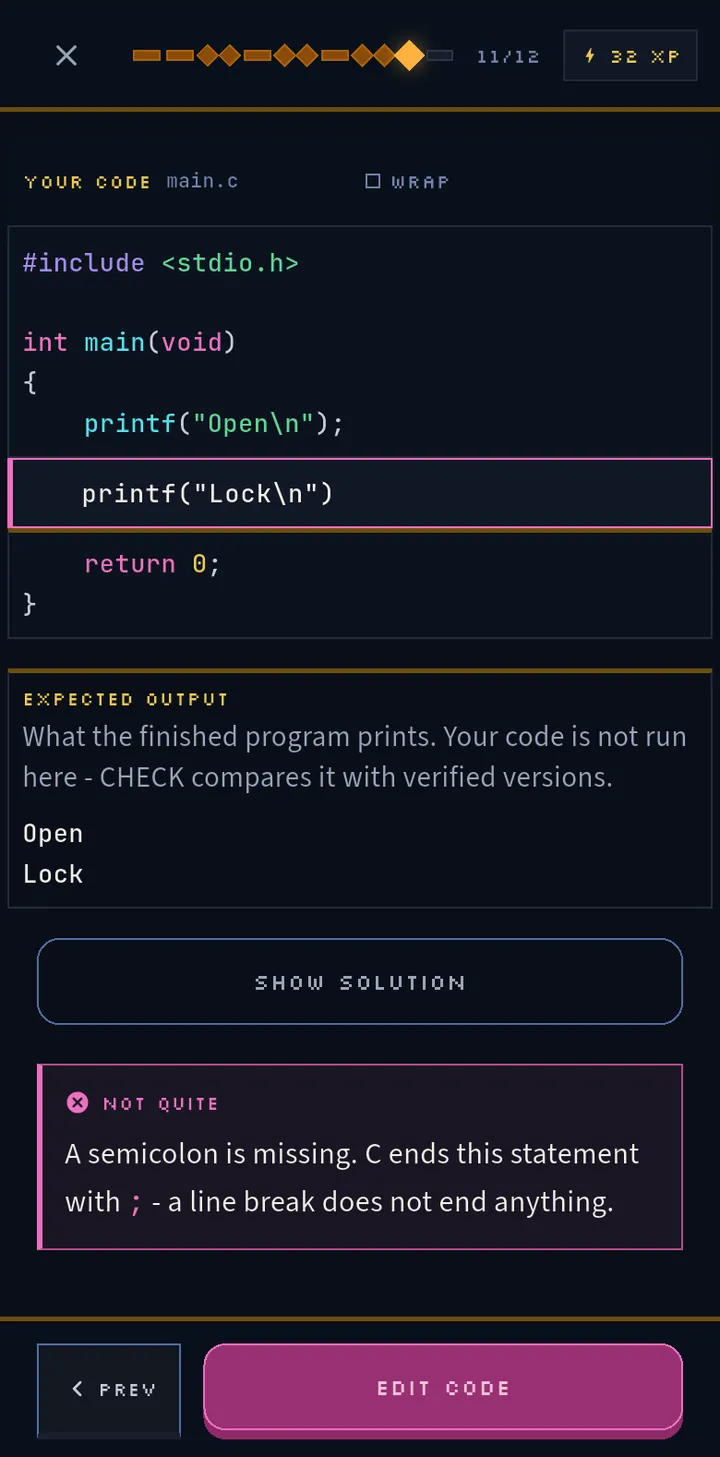
The typed challenge with printf("Lock\n") entered and no semicolon. A pink panel says Not quite: a semicolon is missing. C ends this statement with a semicolon; a line break does not end anything.

Write it yourself.

Challenges in every course ask you to type the code. A slip gets named, with the fix — here, the missing semicolon. If your version is one the app can’t verify, it says so instead of calling it wrong.

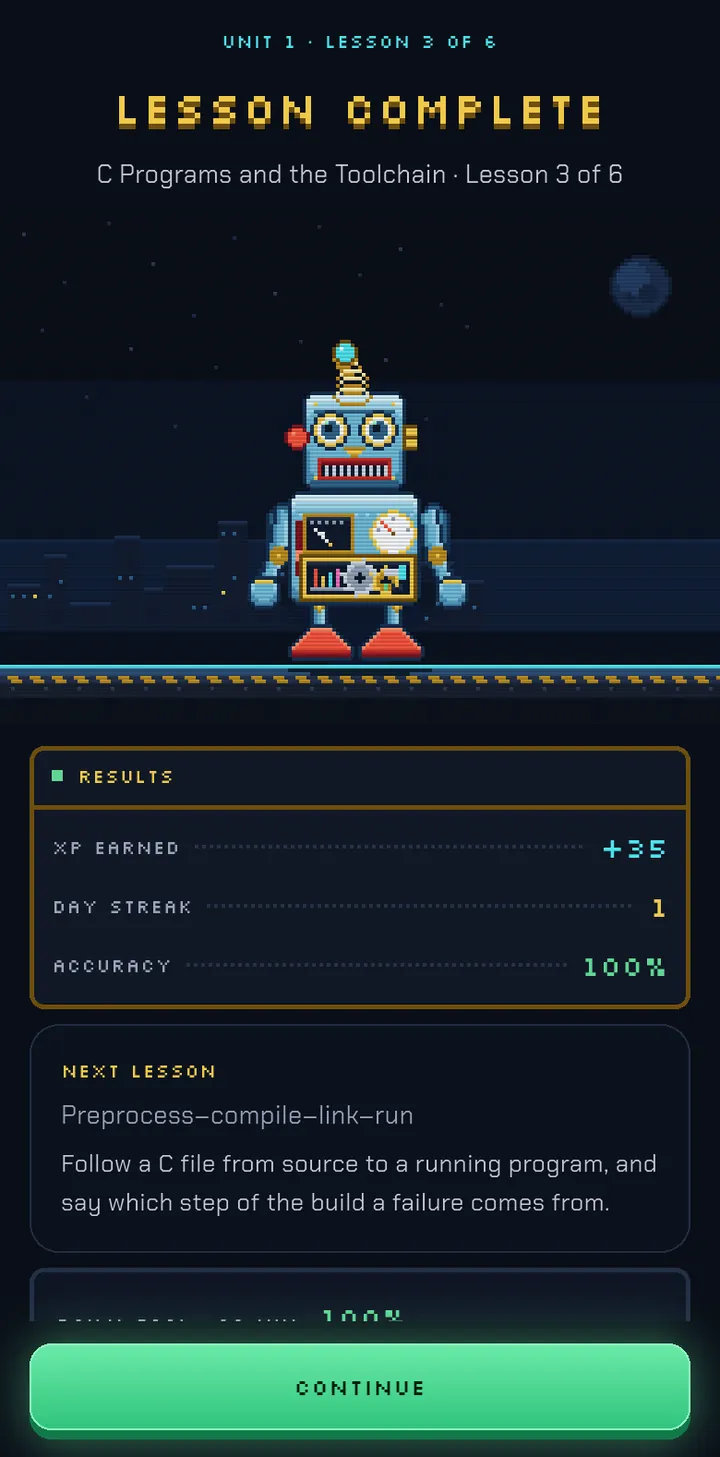
The Lesson Complete screen. Bolt stands on a platform above the results: XP earned, day streak and 100 percent accuracy, and a card naming the next lesson and what it is for.

Clear the stage.

Finish a lesson and Bolt celebrates. You see your XP and streak, and the next lesson says what it’s for. Anything that went wrong first time comes back later in Practice.

Training programs

Pick your program. Clear it stage by stage.

Each course is a map of stages. Every stage says what it’s for, how far you’ve got, and exactly where you left off.

Python Fundamentals

26 stages · new, still being reviewed

From your first print() through lists, dictionaries and functions, to classes, generators, decorators and match. Every program is run on CPython 3.14, and typed challenges run all the way through.

See all 26 stages
  1. First Programs
  2. Names and Values
  3. Numbers and Arithmetic
  4. Text and Input
  5. Making Decisions
  6. Repeating with while
  7. for Loops and range
  8. Lists
  9. Objects, Identity and Mutation
  1. Tuples and Unpacking
  2. Working with Strings
  3. Dictionaries and Sets
  4. Writing Functions
  5. Arguments and Scope
  6. Modules and the Standard Library
  7. Iteration Tools
  8. Comprehensions
  9. Handling Errors
  1. Files and with
  2. Classes and Objects
  3. Special Methods
  4. Inheritance
  5. Iterators and Generators
  6. Decorators
  7. Pattern Matching with match
  8. Type Hints, Docstrings and Packages

C Fundamentals

39 stages · Beginner to Advanced

From your first program and the toolchain that builds it, through pointers, strings and dynamic memory, to alignment, restrict and portable binary formats. Typed challenges run all the way through.

See all 39 stages

Beginner

  1. C Programs and the Toolchain
  2. Variables, Declarations and Values
  3. Integer, Floating and Character Types
  4. Basic Output and the Format Contract
  5. Operators and Expressions
  6. Making Decisions
  7. Loops
  8. Functions, Scope and Lifetime
  9. Arrays
  10. C Strings
  11. Structures
  12. Pointer Fundamentals
  13. Dynamic Storage and Ownership
  14. Beginner Project

Intermediate

  1. Checked Input and Text Conversion
  2. Numeric C and Conversions
  3. Expression and Control Extensions
  4. Arrays II
  5. Pointers II
  6. Strings and Raw Memory
  7. Dynamic Storage II
  8. Structures II and Recursive Data
  9. Typedefs, Enums and Qualified Types
  10. Function Pointers and Callbacks
  11. Headers, Preprocessor and Multi-file Programs
  12. File I/O and Command-line Programs
  13. Unsigned Bit Operations
  14. Intermediate Project

Advanced

  1. Object Representation and Portability
  2. Alignment, Padding and Layout
  3. Unions and Compound Literals
  4. Advanced Declarators and Qualification
  5. Aliasing and restrict
  6. Advanced Preprocessor
  7. C inline, Linkage and Program Boundaries
  8. Representation-sensitive Bits
  9. Robust Resource Management
  10. Portable Binary Formats
  11. Advanced Project

Modern C++

37 stages · Beginner to Advanced

First programs, types and references, and classes, through copy control, operator overloading and the standard library, to move semantics, smart pointers and templates. Typed challenges from the very first stage.

See all 37 stages

Beginner

  1. First Steps in C++
  2. Variables and Types
  3. Operators and Expressions
  4. Decisions
  5. Loops
  6. Functions
  7. Arrays, Strings and Containers
  8. References and Pointers
  9. Classes and Objects
  10. Object-Oriented C++
  11. Resource Management
  12. Standard Library in Practice

Intermediate

  1. Programs in Several Files
  2. Arithmetic Conversions
  3. Bits, Casts and Enumerations
  4. Values, Temporaries and Lifetime
  5. Choosing and Computing Functions
  6. Namespaces and Name Lookup
  7. Pointers, Arrays and Functions
  8. Strings and Vectors in Depth
  9. How Objects Are Constructed
  10. Class Interfaces
  11. Composition and Files
  12. Operator Overloading
  13. Copy Control
  14. Standard Library II

Advanced

  1. Translation Units and Compile-Time Tools
  2. Advanced References, Memory and Type Deduction
  3. Aggregates and Initializer Lists
  4. Inheritance Mechanics
  5. Polymorphism and RTTI
  6. Class-Type Conversions and Comparisons
  7. Move Semantics
  8. Exception Safety and Smart Pointers
  9. Templates
  10. Streams, Files and Concurrency
  11. Practical C++: Building, Checking and Shipping

Coming to C++ from C?

When you start C++, you say where you’re starting from. That decides how much the general explanations are shortened — never the parts that are specific to C++.

New to programming
Everything is explained from the beginning.
I already write C
A short check comes first. Only what you actually pass can shorten a later explanation — saying you know C isn’t enough on its own. You can decline the check and start from the beginning.
I finished the Ugiwise C course
Credit comes from the C lessons you completed, so there’s nothing to prove again.
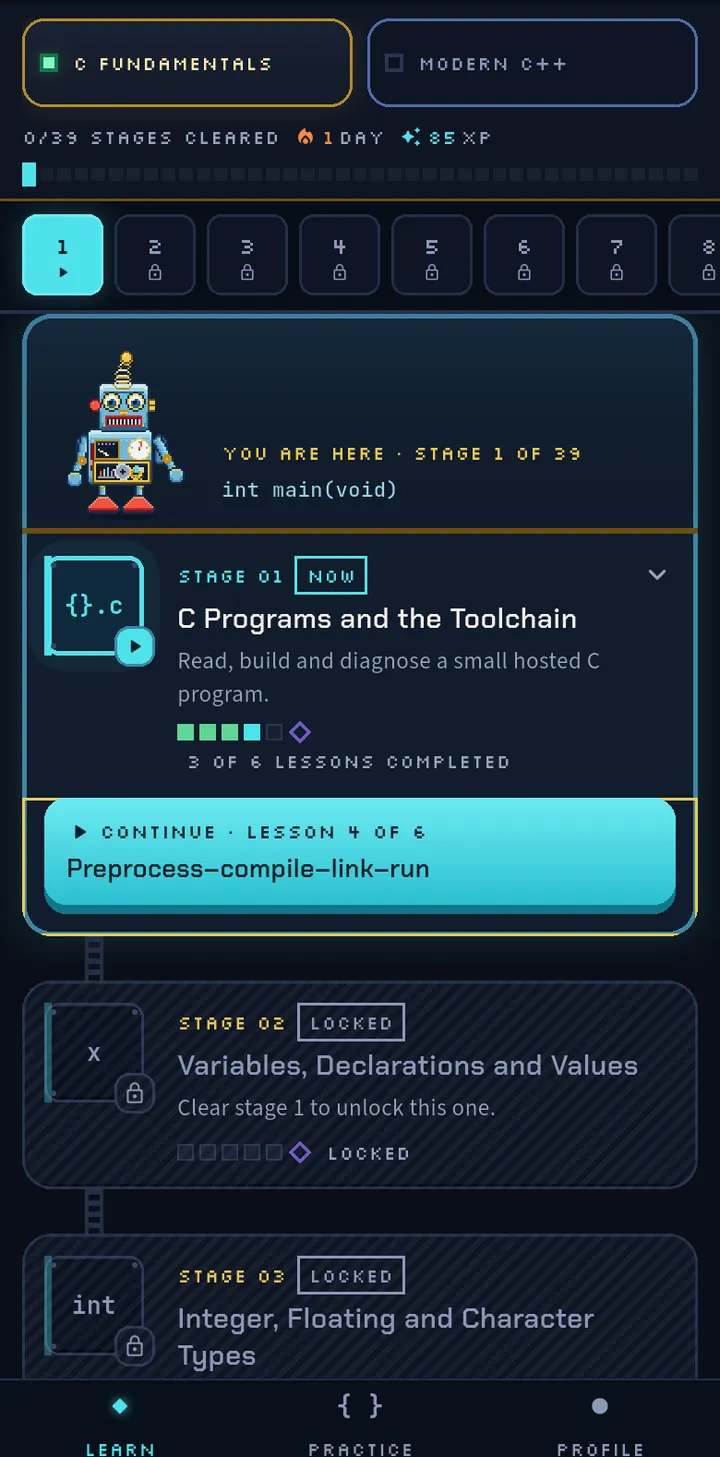
The stage map for C Fundamentals. Stage 1, C Programs and the Toolchain, is current with 3 of 6 lessons completed, and a Continue button opens lesson 4, Preprocess-compile-link-run. Stages 2 and 3 are locked until stage 1 is cleared.
The map: one stage at a time, and a Continue button that knows where you were.

Built to be trusted

Real code, honest feedback, nothing to sign up for.

Code that really ran

The C and C++ programs in the lessons are built with GCC, warnings on, and the Python ones run on CPython. What a lesson says a program prints is checked against what it really prints.

Feedback that doesn’t guess

A wrong answer shows your pick, the right one and why. A typed answer the app can’t verify is never marked wrong.

Practice that remembers

Lessons you stumbled on come back one idea at a time, with a different question about the same idea where there is one. There’s also a bank of C interview questions, grouped by theme.

Offline, no account

Lessons live inside the app and your progress stays on your phone. There’s no sign-up, and the app doesn’t need a connection.

FAQ

Not out yet. Here’s where it stands.

Can I download it?
Not yet. Ugiwise is in development for Android and isn’t in any app store. There’s no release date — when there’s a way to get it, it will be on this page.
Does it run my code?
No. Nothing is compiled or run on your phone, or on this page. Your answer is compared with versions that were checked by really building or running them when the challenge was written. If it can’t be sure, it tells you so instead of marking you wrong.
Which versions?
Standard C17 and C++23, as compiled by GCC with warnings on, and Python 3.14 as run by CPython. Where a result depends on the compiler, the interpreter or the machine, the lessons say so.
Do I need to know C before C++?
No. You can start C++ from scratch. If you already know C, a short optional check can shorten the general explanations you don’t need.
What language is the app in?
English.